Free Chrome extension
Find broken links in 1 click.
See exactly where they are.
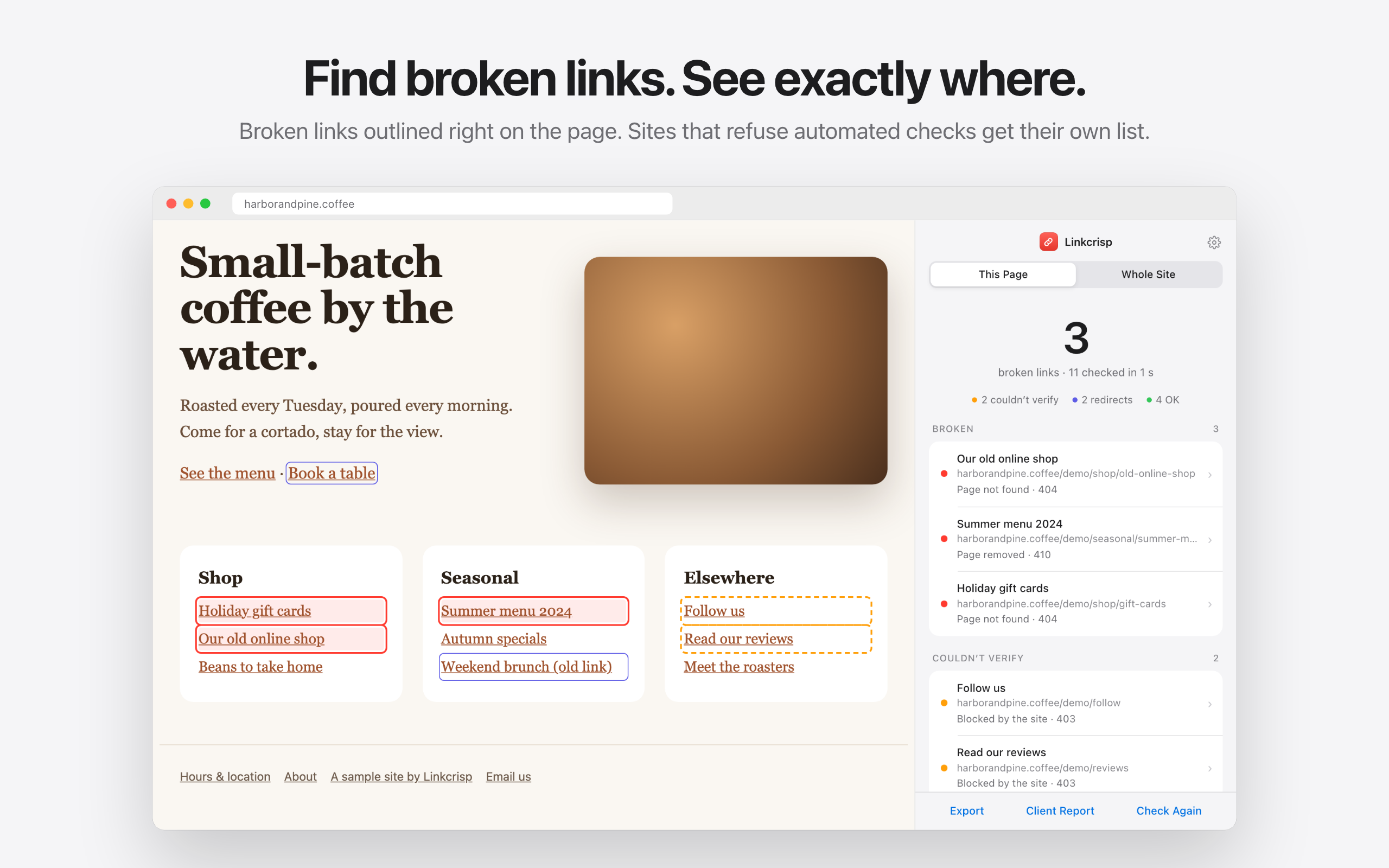
Linkcrisp checks every link on a page — or your whole site — and marks the broken ones right on the page. Links to sites that block automated checks go to a separate list, so you don’t chase links that work.
No account. Works in Chrome’s side panel.
For the moments a broken link costs you.
Visitors hit a dead end. Search engines notice. A client finds it before you do.
Before you publish
Test every link on the new page in one click.
After a redesign or move
Old URLs break quietly. Scan the whole site and see which page links to them.
Auditing a client’s site
Hand over a clean report: what’s broken, where it is, what to fix first.
What “done” looks like.
Slow sites are retried. Sites that block automated checks (403, 429, LinkedIn’s 999) go to “Couldn’t verify” — not into your broken list.
Broken links are outlined right on the page. Click one in the list and the page scrolls to it.
Reads your sitemap — or follows your links — and shows which pages each broken link is on. Up to 500 pages per scan.
One-click HTML report for a client, or a CSV for your own list. Broken links first.
Three steps. No setup.
Open the page
Any page you want to check — yours or a client’s.
Click the icon
Or right-click → “Check links on this page”. Chrome asks once for access to check links.
Fix what’s red
Most pages are done in under 10 seconds. Each address is checked once, even if it appears ten times.
Blocked isn’t broken.
Many sites turn away automated requests — Cloudflare, LinkedIn, large stores. A checker that calls those “broken” sends you chasing links that work. Linkcrisp retries slow responses and keeps blocked links in their own list, so you only fix what’s actually broken.
Why checkers report 403 and 999 ›Private by design.
Access only when you check
Nothing to approve at install. Chrome asks for access the first time you check a page.
Checks run from your browser
Links are requested directly from your computer. Page content is never sent to us.
No ads, no surprise tabs
One welcome tab after install, nothing after that. Apart from the link checks themselves, it sends only anonymous daily usage counts — and you can turn that off. Privacy policy
Page checks: free forever.
Checking pages — unlimited, forever, with CSV and client reports. Whole-site scans too — and until Pro launches, even after your first 3.
Unlimited site scans and a daily check of your site that tells you when a link breaks.
Get notified ›Questions
Why does it ask for access to all sites?
To check a link, the extension has to request it — and links can point anywhere. Chrome asks only when you first check a page, and the access is used for nothing else.
What does “Couldn’t verify” mean?
The site refused an automated request or responded too slowly, even after retries. The link may work fine in a browser — open it to confirm.
Does it work on Webflow, Shopify, WordPress?
Yes — it checks the page as your browser shows it, whatever built it. For whole-site scans it reads the sitemap these platforms publish. Webflow guide
How big a site can it scan?
Up to 500 pages and 20,000 links per scan, and up to 2,000 links on a single page.
Does it work on password-protected or staging sites?
Page checks work on any page you can open. Links to pages that need a login show as “Couldn’t verify”, because checks are sent without your cookies.
Who makes it?
An independent developer. Questions and bug reports: support.